Concept Walkthroughs
A daily plan the customer puts together
 Ratik6 min read
Place topical products in your own time slots, save an editable plan and report check-ins without turning a shopping choice into product-use guidance.
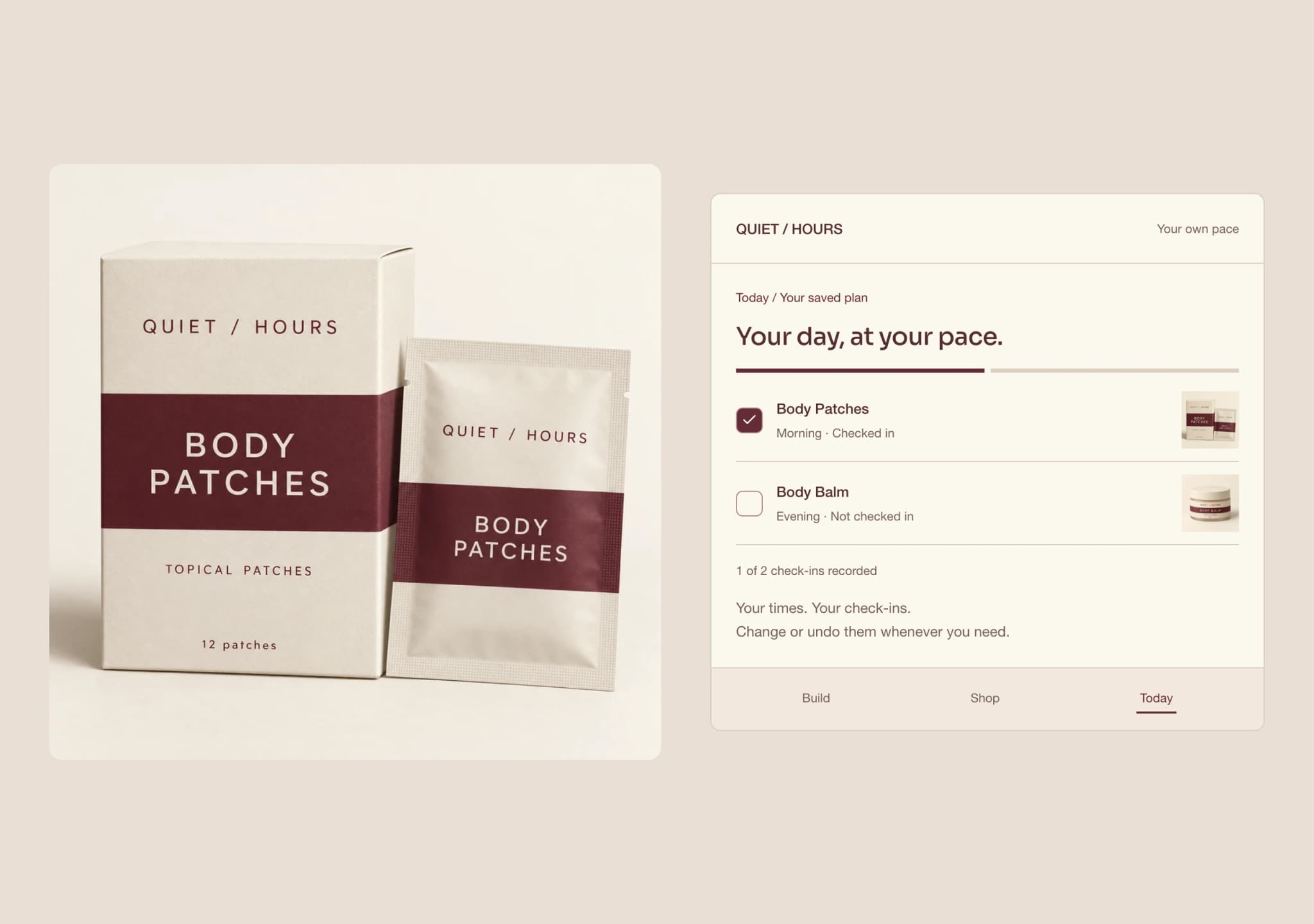
Neither product has a time slot when Daily Routine opens. You can put Body Patches in Morning, Day or Evening, choose a different slot for Body Balm, or leave either out. The plan comes from those choices. The interface does not decide that two products belong together or tell you when to use them.
QUIET / HOURS is a fictional brand with authored product facts and AI-generated imagery. The gallery shows a composed plan; the interactive experience starts with nothing selected. Its check-ins are customer reports, not verified use, adherence or a health outcome. All changes stay on the page.
Give the customer an empty starting point
The range contains two products: Body Patches, a box of 12 topical patches priced at $24, and Body Balm, a 45 g jar priced at $28. Those facts identify what is being organized and what can be reviewed in Shop. They do not establish a wear schedule, an amount to apply or suitability for a particular person.
The builder lets the customer place either or both products in Morning, Day or Evening. No slot is selected on their behalf. Leaving a product out is a complete choice, not an unanswered question the interface needs to correct.
That empty starting point matters. A populated planner can look like a recommendation even when its author intended it as an example. Here the saved plan reflects an explicit selection. The time belongs to the customer’s organization of the day, not to a rule inferred from the packaging.
Keep the draft separate from the saved plan
After choosing products and time slots, the customer keeps a purchase preference of one or two units for each selected product. Body Patches uses boxes; Body Balm uses jars. This quantity carries into a later shopping review. It is not an amount to use or a number of daily applications.
The review step shows the draft before an explicit save changes the plan. Editing a slot or quantity does not silently update Today. The customer can inspect a change and discard it, returning to the saved choices instead.
This distinction should remain visible throughout the journey. A screen that says Saved while showing a changed draft makes it difficult to know what will appear next time. A clear draft, an explicit save and a working discard action make the customer’s decision inspectable.
Give each product its own check-in
Today stays empty until the customer saves a plan. It then groups those products under their chosen Morning, Day or Evening slots. The view is built from saved choices rather than a second set of defaults.
Each product has a reversible check-in. The customer can record one, undo it or clear the day. Checking in on Body Patches does not check in on Body Balm, and it does not reduce a stock count. The recorded fact is that someone pressed the check-in control. It does not verify that a product was used or establish progress against a regimen.
The two existing organization tasks remain in an expandable planning checklist: Review your routine and Check what’s on hand. They can be checked and unchecked separately. Their task progress is distinct from the product check-ins, so reviewing a plan does not claim a product has been used.
This gives each action a narrow meaning. The plan records choices. Check-ins record customer reports. The checklist records organization tasks. None of those records needs to stand in for the others.
Review a purchase without ordering the plan
Shop remains a separate review. Choose Body Patches or Body Balm, select one to six boxes or jars and choose One-time or Every 4 weeks. The product facts, unit price and quantity remain visible before Add to Basket. The four-week option concerns delivery, not how often to use the product.
Opening Shop from a saved plan carries the first selected product and its saved purchase quantity into a one-time purchase review. If both products are saved, the other remains available in the product choice. This handoff opens a review of one product; it does not add the whole plan to the basket.
The customer can change the product, quantity or purchase option, add the selection and remove a basket entry. Saving a routine does not create a basket entry. Adding to the basket does not change the routine. A recurring choice creates no real subscription, and this concept has no checkout or order submission.
A production version would need to resolve the actual catalog item, price and availability at the point of purchase. Remembering a preference can reduce repeated input. It cannot authorize an order or make an old catalog value current.
Let reminders follow saved choices
The reminder view uses saved time slots. An unsaved edit does not change the reminder text, and an empty Today view does not invent a morning or evening plan. The control changes a local message only. It requests no notification permission and sends nothing.
This separation makes a useful check possible: change a time in the draft, inspect Today and reminders, then discard the change. The saved plan should still tell the same story. Only an explicit save should replace its choices.
Start Again restores the empty starting point, including draft and saved choices, product check-ins, organization tasks, reminders, purchase options and basket. Reload has the same local boundary. No customer account or persistent history is created.
Keep planning separate from supply and billing
The three related experiences answer different questions. Supply calculates stock and time from declared inputs. Subscription manages the billing relationship, including payment state, pause and cancellation. Routine organizes the customer’s plan.
A saved time is not a delivery cadence. A purchase quantity is not an amount to use. A check-in is not proof of stock consumed, and a missed check-in is not evidence that the customer wants to cancel. Keeping these meanings separate prevents an interface from making decisions the customer did not request.
For a production build, the team would need to define account storage, editing and deletion, the catalog handoff and any permitted notification delivery. Product instructions would need their own approved source and review. This concept does not supply those instructions or infer them from a planning preference.
What this demonstrates
Daily Routine demonstrates a customer-defined plan that can be saved, edited, discarded and revisited, with independent product check-ins and a separate shopping review. The meaningful local result is that the intended choices survive each transition. The concept reports no retention lift or improved adherence.
Try placing the two products in different slots, saving, then changing one slot without saving. Compare the draft with Today. Undo a check-in and open the saved purchase quantity in Shop before adding anything. These actions show whether the plan belongs to the customer at every step.
If your current experience treats a billing schedule as the whole customer routine, bring that gap to us. We can discuss a focused prototype that separates what the customer plans, what they report and what they choose to buy.
What would this look like for your brand?
Talk directly with a founder about one customer journey, the systems behind it and a focused prototype using your approved products and content.